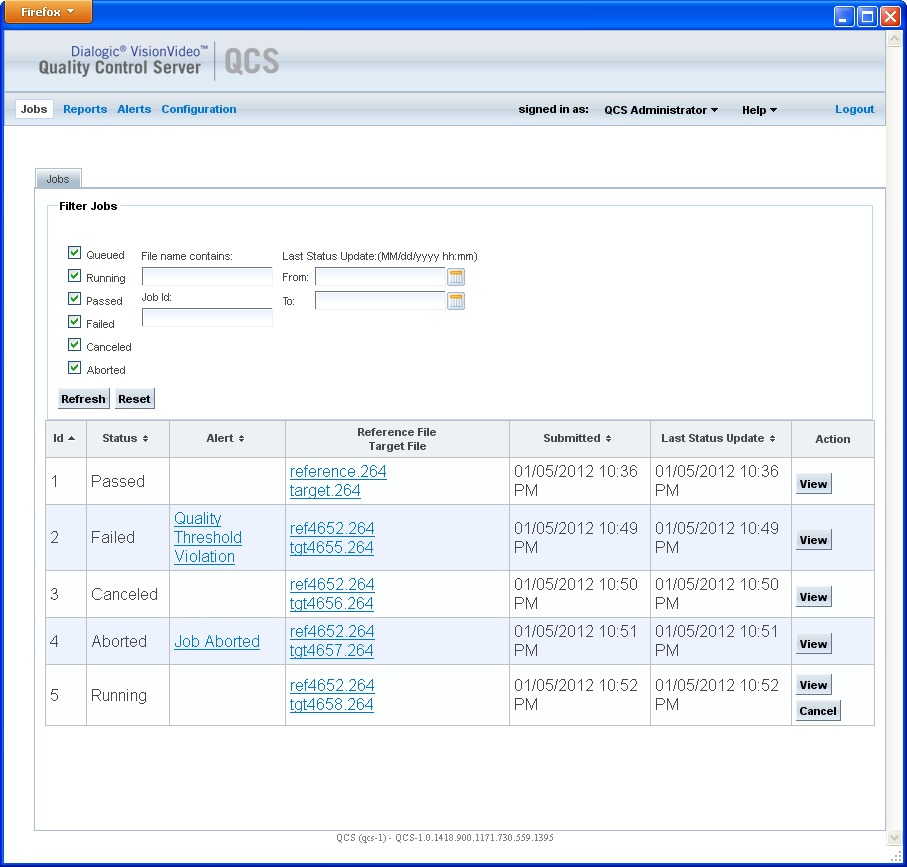
After jobs have been submitted to the VisionVideo QCS, you can view the status of jobs on the Jobs page. To access this page, click Jobs on the menu bar.
The list of jobs can only be viewed after setting some filter parameters. Select the attributes of the jobs you wish to view under Filter Jobs, and click Refresh. Jobs that match the selected attributes are then displayed in the list of jobs. Click Clear to clear the jobs in the list.
The list shows only a certain number of matches, not necessarily all jobs that meet the filter requirements. The number of matches shown is controlled by a system parameter; see Configuring System Parameters.
The following table provides a brief description of the filter parameters.
Parameter |
Description |
Queued |
Include jobs that are in the queue waiting for analysis. |
Running |
Include jobs that are currently being analyzed. |
Passed |
Include jobs that have been analyzed and have passed all of the quality thresholds. These jobs have completed without any job alerts. |
Failed |
Include jobs that have been analyzed and have failed to pass one or more of the quality thresholds. |
Canceled |
Include jobs that have been canceled. |
Aborted |
Include jobs that cannot be analyzed. A job is aborted when a video file cannot be read or is in an unsupported format. |
File name contains |
Include jobs that specify files whose names match or partially match the value in this field. This is an optional parameter. |
Job Id |
Include a specific job based on its job ID. |
Last Status Update |
Include jobs whose last status update is within the date and time specified by this parameter. This is an optional parameter. If not specified, the filter is applied to all jobs in the database. |
Following is an example of a Jobs page from the Jobs menu.
The following table describes the fields in the resulting jobs list. You can click the small arrow key next to a column label to change the sort order of the jobs displayed.
Column Label |
Description |
ID |
Unique ID of the job |
Status |
Job status |
Alert |
Alert issued for the job, if any:
Click the alert to display the Alert Details page; see Viewing Alert Details. |
Reference File |
The reference file and the target file specified in this job |
Submitted |
The date when the job was submitted |
Last Status Update |
The date of the job's last status update |
Action |
Click View to see the details of a completed job. Click Cancel to cancel a running job or a job in the queue that is waiting to be analyzed. |