Although there are many definitions and terms (such as Web APIs) for web services, a web service can be generally described as a software system designed to support interoperable machine-to-machine interactions over a network, specifically using HTTP.
The PowerMedia WMS is a media control interface using HTTP requests and responses to control the features provided by the product.
When designing the web service, the choice of which protocol to use is an important decision. There are many protocols and approaches that can be considered; however, as of the publication of this document, the three most popular and widely accepted web service protocols are REST, SOAP, and Plain Old XML (POX).
The protocol used by the PowerMedia WMS interface is the Representational State Transfer (RESTful) approach.
The REST protocol is resource-based and uses various HTTP methods (GET, PUT, POST, and DELETE) to manipulate the resource. In general, the various HTTP methods can be translated to the actions shown in the following table.
HTTP Method |
Action Taken By Web Service |
|
GET |
Retrieve information for all instances of a specific resource type, or retrieve information regarding a specific resource. |
Contents of resource information. This can be for all instances of a specific resource type or for an individual resource. |
POST |
Create a new resource. |
Contents of newly created resource. |
PUT |
Modify an existing resource. |
Contents of updated resource. |
DELETE |
Delete an existing resource. |
N/A |
Note: the appid is an arbitrary user-selected text string for the user to select to identify the application server making the requests and receiving the responses.
The mechanism by which media control functionality is invoked is the HTTP request / response model. A RESTful HTTP request is sent to the PowerMedia WMS. The HTTP response carries the resulting response code of the operation as well as a response body if it applies to the specific operation.
As an example, if a client wished to retrieve a list of all MediaStreams (RTP sessions) currently active on the PowerMedia WMS, it would issue an HTTP GET request. The following HTTP GET request would be sent by the client to the PowerMedia WMS interface running on PowerMedia WMS with IP address of <server>:
http://<server>/DialogicWebService/mediacontrol/mediastreams
If successful, the response code to the HTTP
GET would be 200 OK.
The response body would resemble the following
example.
<mediastreams size="3">
<mediastream identifier="1502324709" appid=<application ID>
href="http://192.168.1.248:81/DialogicWebService/mediacontrol/mediastreams/1502324709"
clientipaddress="192.168.1.215" serveripaddress="192.168.1.248">
<audio codec="ulaw" enable2833="true" payload="0" fmtp="" clientport="2266" serverport="6380" />
</mediastream>
<mediastream identifier="1992483494" appid=<application ID>
href="http://192.168.1.248:81/DialogicWebService/mediacontrol/mediastreams/1992483494"
clientipaddress="192.168.1.225" serveripaddress="192.168.1.248">
<audio codec="ulaw" enable2833="true" payload="0" fmtp="" clientport="2242" serverport="6314" />
</mediastream>
<mediastream identifier="1279697438" appid=<application ID>
href="http://192.168.1.248:81/DialogicWebService/mediacontrol/mediastreams/1279697438"
clientipaddress="192.168.1.202" serveripaddress="192.168.1.248">
<audio codec="ulaw" enable2833="true" payload="0" fmtp="" clientport="29270" serverport="6382" />
<video codec="h263-1998" payload="115" fmtp="qcif=2 maxbr=1960"
clientport="16852" serverport="6384" />
</mediastream>
</mediastreams>
The above example shows a client requesting information for all MediaStreams. The example shows three active RTP stream pairs – each pair consisting of audio and optionally video RTP stream. The example also shows identifier and other properties of each MediaStream. See MediaStream for further information.
If a client wanted to retrieve information for only a single specific MediaStream, it would invoke the following HTTP GET request. The specific MediaStream identifier is part of the GET URL.
http://<server>/DialogicWebService/mediacontrol/mediastreams?appid=<appid>
If successful, the response code to the HTTP GET would be 200 OK.
The response body would resemble the following example.
<mediastream identifier="1279697438" appid=<application ID>
href="http://192.168.1.248:81/DialogicWebService/mediacontrol/mediastreams/1279697438"
clientipaddress="192.168.1.202" serveripaddress="192.168.1.248">
<audio codec="ulaw" enable2833="true" payload="0" fmtp="" clientport="29270"
serverport="6382" />
<video codec="h263-1998" payload="115" fmtp="qcif=2 maxbr=1960"
clientport="16852" serverport="6384" />
</mediastream>
Additional request / response examples are contained in the Functionality topics.
The application (client) that uses PowerMedia WMS to control the product also controls the SIP sessions that exist between the application and the telephony network. As such, the SIP Session Description Protocol information is used by the application to create web services based MediaStreams. The examples above show attributes of a MediaStream. The attributes include RTP IP addresses, port numbers, and codec types. This information is mapped into the SDP that accompanies the SIP session being setup by the application.
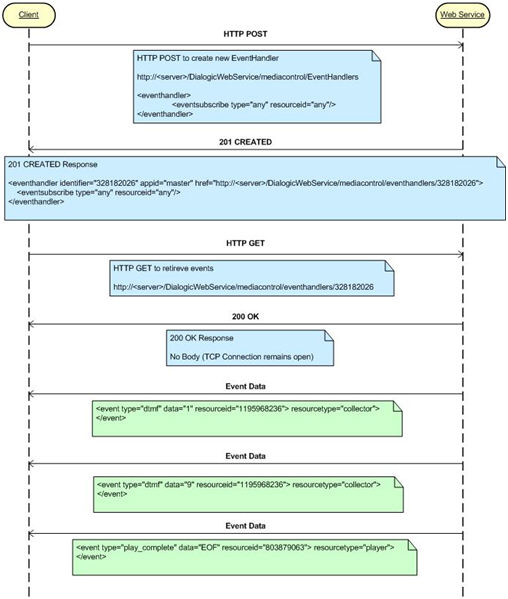
Telephony applications must handle unsolicited events such as digit detection and play completion events. Unsolicited events or client notifications do not fit well into the HTTP request / response model. However HTTP does support other mechanisms that enable this to be supported.
The concept is called Comet or HTTP event streaming. In a normal HTTP interaction, the client sends a request to the server, which performs its processing actions and sends the HTTP response. Then the connection between the client and server is closed. This process will take place continuously as long as the web service is running; however, with HTTP event/data streaming, the TCP connection remains open after the response is sent from the server, allowing the server to continue to send raw data to the client without notice.
HTTP event streaming is implemented in the PowerMedia WMS EventHandler resource. When the client wishes to receive asynchronous events, it uses the PowerMedia WMS to create an EventHandler and subscribes to specific event types. When the client performs an HTTP GET on the newly created EventHandler, the PowerMedia WMS responds with a 200 OK; however, the TCP connection remains open until the client destroys the EventHandler. Event data related to resources and event types subscribed to are be pushed to the client until the Eventhandler is deleted by the client.
The following diagram depicts an example scenario where a client creates an EventHandler and receives digit detection and play completion events.