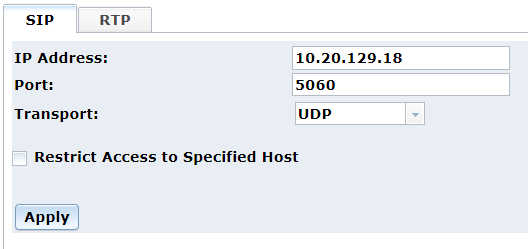
The Protocol menu contains tabbed pages, SIP and RTP.
Note: This Protocol menu applies to PowerMedia XMS network settings, while the Network menu applies to system network settings.
The SIP page is used to configure the IP Address, Port, or Transport information.
The following information is provided:
Item |
Description |
IP Address |
Specifies the SIP IP address. To change the address:
|
Port |
Specifies the SIP listening port. The default is 5060. |
Transport |
Displays the transport protocol. Two protocols are available from the drop down list:
|
Restrict Access to Specified Host |
Click the check box to restrict access to a specified host. |
Changing the SIP IP address is necessary when you have multiple e-net interfaces and want to switch among them, or if you have manually changed the address for the single e-net interface. Refer to the Network menu for more information.
Click Apply to save changes.
Note: A services restart is required when any changes are made to SIP interface configurations.
From the Restrict Access to Specified Host window, you can restrict access to trusted specified hosts.
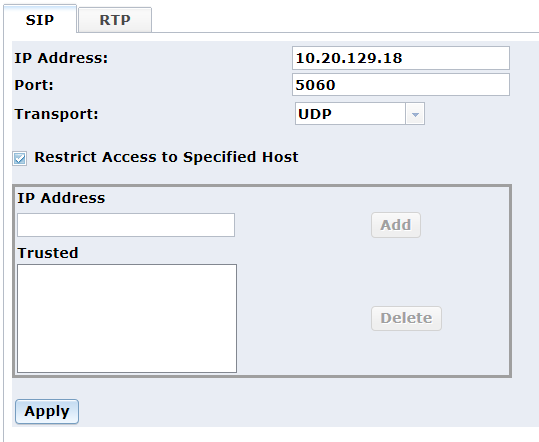
Enter the address you wish to add as a trusted host in the IP Address field and click Add. The address will be listed in the Trusted section.
To delete a trusted host, click on the address listed in the Trusted section and click Delete.
Click Apply to save changes.
The RTP page is used to select the Interface Name.
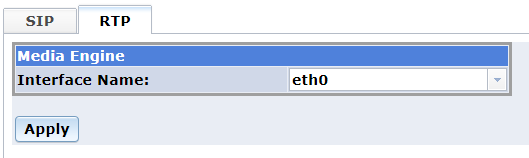
Select the appropriate interface name from the Interface Name drop-down list.
Click Apply to save changes.
In MSML mode, you can change the RTP IP Address Mode.
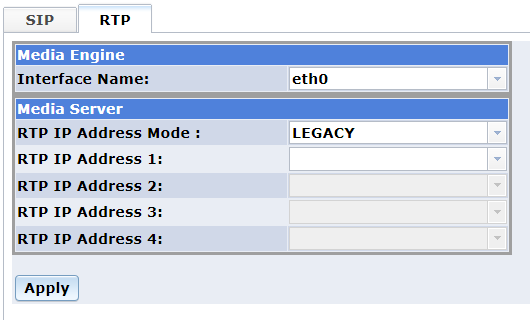
Use the RTP IP Address Mode drop-down list to select the value. Valid values are:
LEGACY (Default value)
A single RTP IP address should be specified.
ACTIVE_STANDBY
Up to two (2) RTP IP addresses should be specified.
LOAD_BALANCE
Up to four (4) RTP IP addresses should be specified.
Click Apply to save changes.