Before you connect a CG 6060C board to an E1 network, ensure that the E1 interface is configured as described in Configuring the T1 or E1 interface.
This topic provides information for connecting to an E1 network. Choose one of the following procedures to connect to an E1 network:
For information about the products available for connecting and terminating boards, refer to the Dialogic® Hardware Connectivity Manual.
|
Caution: |
Dialogic obtains board-level approvals certificates for supported countries. Some countries require that you obtain system-level approvals before connecting to the public network. To learn what approvals you require, contact the appropriate regulatory authority in the target country. |
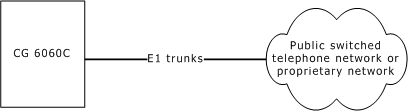
CG 6060C boards configured as E1 have up to sixteen CEPT E1 interfaces. For typical E1 communications, each E1 interface connects directly to an E1 trunk, as shown in the following illustration:
Note: Trunks synchronize when the OAM API boots the board.
Use a shielded RJ-48 cable to connect a CG 6060C board with RJ-48C interfaces configured as 120 ohm to an E1 trunk. Failure to use a shielded cable can negate your Class B approval.
Connect a shielded 50-pin Telco cable to a signal entry panel (SEP) or a punchdown block. Failure to use a shielded cable may negate your regulatory approval.
In EU countries, you can connect the board to either an Integrated Services Digital Network (ISDN) Primary Rate Interface (PRI) or to a 2048 kbit/s digital structured or unstructured leased line.
Configure the board as E1 75 ohm and use an RJ-48C to BNC splitter cable. The shield for this cable is connected to both transmit and receive BNC connectors.
or
Configure the board as E1 120 ohm and use a shielded RJ-48C cable to connect each RJ-48C interface on the CG 6060C board to a 75 ohm BNC balun.
Configure the board as E1 120 ohm and connect a shielded 50-pin Telco cable to a punchdown block. Then connect each RJ-48C interface on the punchdown block to a 75 ohm BNC balun to convert the impedance from 120 ohm to 75 ohm.