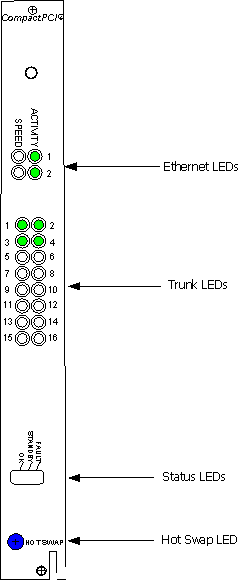
The CG 6060C board contains the following types of LEDs:
Ethernet LEDs indicate the status of the Ethernet connections.
Trunk LEDs indicate if the frame and the trunk are properly synchronized.
Status LEDs indicate the state of the board.
Hot Swap LED indicates when it is safe to remove the CG 6060C board from the system.
The following illustration shows the location of each type of LED:
The status of each Ethernet interface is indicated using two LEDs, as described in the following table:
|
LED |
Description |
||||||
|
ACTIVITY |
There is activity on the Ethernet link. When the Ethernet establishes link integrity and there is transmit or receive activity on the link, this LED flickers on. |
||||||
|
SPEED |
If a reliable Ethernet connection has been established (the ACTIVITY LED is flickering), this LED indicates the data rate of the Ethernet link.
|
The CG 6060C board has one indicator (LED) for each trunk. A solid green LED indicates proper frame synchronization to the trunk: all required framing alignment has been found.
A blinking LED indicates one or more of the following conditions exists:
All ones alarm ( AIS)
Loss of frame
Loss of signaling multiframe
CRC errors (when the board is configured for HDB3)
Red or yellow alarm
Note: When the board is not configured, all trunk indicators are turned off.
An unlit LED indicates the corresponding trunk is not available. Also, no trunk LEDs will be illuminated if the NetworkInterface.T1E1[x].Type keyword is set to NONE.
The status LEDs indicate the state of the board, as described in the following table:
|
LED label |
Description |
|
Fault |
Illuminated red: an error condition exists. |
|
Standby |
Illuminated yellow during board initialization. When the board is successfully initialized, the LED turns off. |
|
OK |
Illuminated green and blinking slowly: the board is functioning as expected. |
The Hot Swap LED (blue) illuminates when it is safe to remove the CG 6060C board from the system. The LED illuminates under one of the following conditions:
If the board is fully inserted when the backplane is powered-up, the blue LED momentarily flashes. This is a normal part of the initialization process.
After opening the handles (during the extraction process), the LED illuminates to indicate that it is safe to remove the board. Do not remove the board until the LED illuminates. This occurs only if Hot Swap software is present.
If the LED remains illuminated after insertion of a board and after you have closed the handles, the board failed to successfully perform its primary hardware initialization. While it is safe to remove the board, this condition indicates a problem.
The Hot Swap operation is defined in the CompactPCI Hot Swap Specification PICMG 2.1 R1.0.
Do not hot swap the rear I/O transition board while the CG 6060C board is powered up. You must power down the CG 6060C board to remove or replace the rear I/O transition board. For more information about high availability and Hot Swap, refer to the Dialogic® NaturalAccess™ OAM API Developer's Manual.