When multiple boards are connected to the CT bus, you must set up a bus clock to synchronize timing between them. In addition, you can configure alternative (or fallback) clock sources to provide the clock signal if the primary source fails.
|
Caution: |
NMS strongly recommends that you do not mix H.100/H.110 systems with MVIP systems when doing clock fallback. |
Refer to the NMS OAM readme for more information about clocking capabilities.
This topic describes:
To create a robust clocking configuration, you must understand basic clocking concepts such as clock mastering and clock fallback. This topic assumes that you have a basic understanding of CT bus clocking. For a complete overview of CT bus clocking, refer to the NMS OAM System User's Manual.
This topic describes the rules and limitations that apply to setting up CT bus clocking for AG 2000-BRI boards.
When an AG 2000-BRI board is configured as the system primary clock master, the AG 2000-BRI board uses its own clock fallback mechanism. For more information, refer to AG 2000-BRI clock fallback.
Note: Use the AG 2000-BRI board as primary clock master only if no other boards with digital trunks (except other AG 2000-BRI boards) exist in the system.
An AG 2000-BRI board cannot drive one CT bus clock (A_CLOCK or B_CLOCK) based upon the other. For this reason, an AG 2000-BRI board cannot be used as a secondary clock master.
When an AG 2000-BRI board is configured as a clock slave:
The board's first timing reference must be the system's primary clock.
The board cannot switch to a secondary timing reference if the primary reference fails. For this reason, it cannot take advantage of a secondary clock master if the primary clock master stops driving the clock.
The following tables summarize the CT bus clocking capabilities of AG 2000-BRI boards.
|
Capability |
Yes/No |
Comments |
|---|---|---|
|
Serve as primary master |
Yes |
|
|
Drive A_CLOCK |
Yes |
|
|
Drive B_CLOCK |
Yes |
|
|
Available primary timing references: |
||
|
Local trunk |
Yes |
The board can use any of its trunks interchangeably as a timing reference. |
|
NETREF1 |
Yes |
The application must reconfigure the board as soon as possible if NETREF1 fails. |
|
NETREF2 |
No |
NETREF2 is available for H.110 boards only. |
|
OSC |
Yes |
|
|
Fallback to secondary timing reference |
No |
|
|
Available secondary timing references: |
||
|
Local trunk |
No |
|
|
NETREF1 |
No |
|
|
NETREF2 |
No |
NETREF2 is available for H.110 boards only. |
|
OSC |
No |
|
|
Slave to secondary master if both references fail |
No* |
*The AG 2000-BRI uses a special clock fallback mechanism in this case. For more information, refer to AG 2000-BRI clock fallback. |
|
Capability |
Yes/No |
Comments |
|---|---|---|
|
Serve as secondary master |
No |
|
|
Drive A_CLOCK |
No |
|
|
Drive B_CLOCK |
No |
|
|
Available secondary timing references: |
||
|
Local trunk |
No |
|
|
NETREF1 |
No |
|
|
NETREF2 |
No |
NETREF2 is available for H.110 boards only. |
|
OSC |
No |
|
|
Capability |
Yes/No |
Comments |
|---|---|---|
|
Serve as slave |
Yes |
|
|
Slave to A_CLOCK |
Yes |
|
|
Slave to B_CLOCK |
Yes |
|
|
Available fallback timing references: |
||
|
A_CLOCK |
No |
|
|
B_CLOCK |
No |
|
|
OSC |
No |
|
|
Capability |
Yes/No |
Comments |
|---|---|---|
|
Drive NETREF1 |
Yes |
A slave may be directed by the clock fallback manager to drive NETREF to provide the clock master with a timing signal. For more information, refer to AG 2000-BRI clock fallback. |
|
Drive NETREF2 |
No |
NETREF2 is available for H.110 boards only. |
|
Operate in standalone mode |
Yes |
|
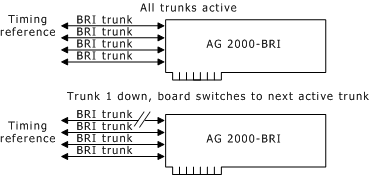
When an AG 2000-BRI is used in standalone mode or as a clock master, it implements a clock fallback scheme that is different from the standard fallback scheme implemented on other NMS boards. A BRI trunk does not provide timing signals unless there is a call on the trunk. If no calls exist on the trunk, the trunk shuts down.
To get around this problem, the AG 2000-BRI is designed to switch between any of its trunks as a timing reference: if one trunk shuts down, the board immediately checks its other trunks, and switches to the first live trunk it finds. In this way, as long as at least one BRI trunk is active, the board has a valid timing reference.
AG 2000-BRI standalone board
If multiple AG 2000-BRI boards are connected over the CT bus and an AG 2000-BRI board is clock master, the clock master can obtain a valid timing reference even if all of its trunks shut down. In this case, the clock fallback manager locates another board on the CT bus that has an active BRI trunk, and directs that board to drive the NETREF signal based on the trunk. The clock master then drives the system clock using NETREF as a timing reference.
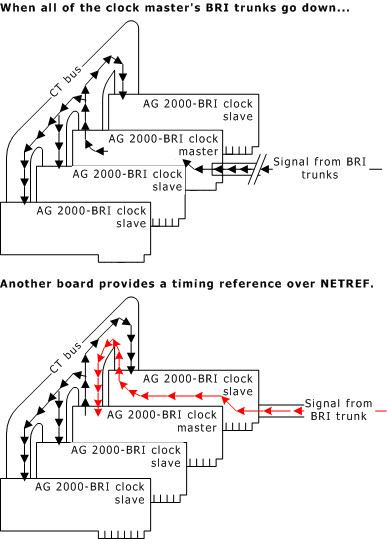
AG 2000-BRI clock fallback
If all of the trunks on the board that is driving NETREF shut down, the clock fallback manager chooses another board to drive NETREF. Thus the clock master has a timing reference as long as at least one BRI trunk on one board is active.
Clocking.HBus.BriRef activates the special AG 2000-BRI clock fallback mechanism. Refer to Configuring CT bus clock with keywords for more information.
You can configure board clocking in your system in one of two ways:
|
Method |
Description |
|---|---|
|
Using clockdemo application model |
Create an application that assigns each board a clocking mode, monitors clocking changes, and reconfigures clocking if clock fallback occurs. A sample clocking application, clockdemo, is provided with Natural Access. clockdemo provides a robust fallback scheme that suits most system configurations. clockdemo source code is included, allowing you to modify the program if your clocking configuration is complex. For more information about clockdemo, refer to the NMS OAM System User's Manual. Note: The clockdemo program does not support the special AG 2000-BRI clock fallback mechanism described in AG 2000-BRI clock fallback. If your system contains only AG 2000-BRI boards, configure board clocking using keywords, as described in Configuring CT bus clocks with keywords. |
|
Using board keywords (with or without application intervention) |
For each board on the CT bus, set the board keywords to determine the board's clocking mode and to determine how each board behaves if clock fallback occurs. This method is described in Configuring CT bus clocks with keywords. |
Choose only one of these configuration methods across all boards on the CT bus. Otherwise, the two methods can interfere with one another and board clocking may not operate properly.
The AG 2000-BRI board keywords allow you to configure the board in the following ways:
Note: Use the AG 2000-BRI as primary clock master only if no other boards with digital trunks (except other AG 2000-BRI boards) exist in the system.
The following sections describe how to use board keywords to specify clocking configurations on multiple-board or multiple-chassis systems.
Use the following board keywords to configure an AG 2000-BRI as primary clock master:
|
Keyword |
Description |
|---|---|
|
Specifies the source from which this board derives its timing. Set this keyword to NETWORK. | |
|
Specifies the CT bus clock that the board drives. Set this keyword to either A clock (MASTER_A) or B clock (MASTER_B). | |
|
Set to YES to enable the special AG 2000-BRI clock fallback mechanism. |
Use the following board keywords to configure an AG 2000-BRI as a clock slave:
|
Keyword |
Description |
|---|---|
|
Specifies the CT bus clock from which the board derives its timing. Set this keyword to SLAVE to indicate that the board does not drive any CT bus clock (although the board can still drive NETREF). | |
|
Specifies the source from which this clock derives its timing. Set this keyword to the clock driven by the primary clock master (A_CLOCK or B_CLOCK). | |
|
Enables the special AG 2000-BRI clock fallback mechanism. Set this keyword to YES to allow the clock fallback manager to use any of the trunks on this board to drive NETREF if the primary master's timing reference fails. If it is set to NO, the clock fallback manager will not cause this board to drive NETREF. |
Use the following board keywords to configure an AG 2000-BRI in standalone mode:
|
Keyword |
Description |
|---|---|
|
Specifies the CT bus clock from which the board derives its timing. Set this keyword to STANDALONE to specify standalone mode. | |
|
Specifies the source from which this clock derives its timing. Set this keyword to NETWORK to allow the board to use any of its BRI trunks interchangeably as a timing reference. |
When the AG 2000-BRI board is in standalone mode, the board cannot make connections to the CT bus.