Step
Action
1
If necessary, configure the board as described in Configuring the hardware.
2
Turn off the computer and disconnect it from the power source. Remove the cover and set it aside.
3
If you are placing the board into:
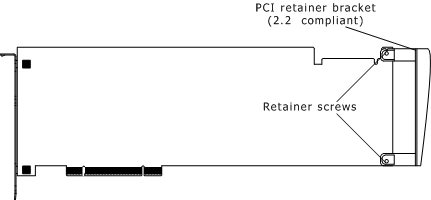
A PCI chassis, remove the PCI retainer bracket by unscrewing it from the board. The bracket is not needed for the board to properly fit into the chassis. The PCI retainer bracket is shown in the following illustration.
An ISA chassis, leave the PCI retainer bracket attached to the board. The bracket is needed for the board to properly fit into the chassis.
4
Arrange the AG 2000 board and other H.100 boards in adjacent PCI bus slots.
Make sure each board's PCI bus connector is seated securely in a slot.
5
If your system contains MVIP-90 boards:
Arrange the MVIP-90 boards in adjacent ISA bus slots. Make sure each board's ISA bus connector is seated securely in a slot.
Connect the MVIP-90 boards to the MVIP-90 bus cable.
Connect the MVIP bus adapter to the AG 2000 board and to the MVIP-90 bus cable.
Connect the AG 2000 board to the H.100 bus cable.
6
If you have multiple H.100 boards, connect the H.100 bus cable to each of the H.100 boards.
7
Replace the cover, and connect the computer to its power source.