Warning:

The CG 6060C board requires an airflow of 200 linear feet per minute (LFM). Failure to follow this guideline can result in damage to the board.
|
Warning: |
The CG 6060C board requires an airflow of 200 linear feet per minute (LFM). Failure to follow this guideline can result in damage to the board. |
Before you install the CG 6060C board, you need to determine which board will be the primary H.110 master and which board will be the secondary H.110 master.
Place the primary master board in the center CompactPCI bus slot of the chassis, and place the secondary master board directly adjacent to the primary master board. All other H.110 boards should be placed in adjacent CompactPCI bus slots, leaving no empty slots between boards.
Note: The CG 6060C board powers up and functions only in a chassis with a telephony backplane.
Complete the following steps to initially install the CG 6060C board:
|
Step |
Action |
|
1 |
Power down the chassis and disconnect it from the power source. |
|
2 |
Remove the rear access panel. You must install the rear I/O transition board before installing the CG 6060C board. |
|
3 |
Verify that the chassis slot has the appropriate keying. |
|
4 |
Slide the rear I/O transition board into a slot at the rear of the chassis. Some older CompactPCI chassis may not have a rear I/O connector alignment feature. The rear I/O transition board requires this feature to allow insertion. Contact the chassis manufacturer to find out if your chassis supports this rear alignment feature. Use caution when inserting the board into the backplane mating connector. |
|
5 |
Seat the rear I/O transition board by rotating the top and bottom handles. |
|
6 |
Fasten the board to the chassis with the screws on the upper and lower handles. |
|
7 |
Slide the board into the corresponding slot in the front of the chassis. |
|
8 |
Seat the board into the backplane by rotating the top and bottom handles toward each other. |
|
9 |
Fasten the board to the chassis with the screws on the upper and lower handles. Refer to the following illustration to see how the CG 6060C board and the rear I/O transition board sit in the chassis. |
|
10 |
Replace the covers and connect the chassis to its power source. |
The following illustration shows the CG 6060C board with a 16-trunk rear I/O transition board:
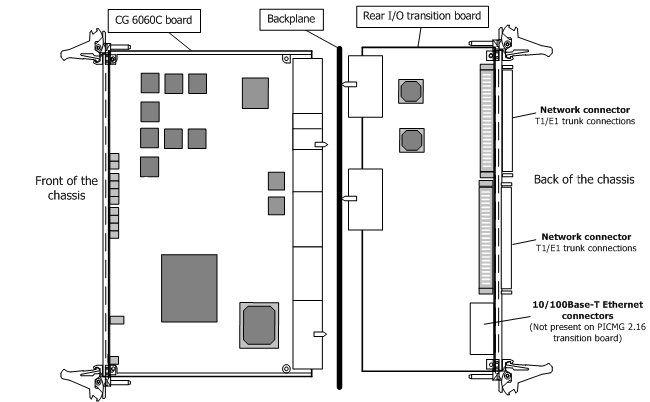
After installing the CG 6060C board, perform the following tasks:
|
Task |
Description |
|
1 |
Install the CG 6060C software available with NaturalAccess. |
|
2 |
Connect the CG 6060C board interfaces to PSTN trunks and Ethernet connections. For more information, refer to the Establishing network connections section which includes the following topics: |